Why Vibe-Coded Apps Break After the Demo (With Examples)
A vibe-coded app fails when real users, real data and real volume arrive. Six failure points, UI/UX to scale, each with an example and the fix.

Vibe-coded apps rarely fail because the AI wrote bad code. They fail because the demo only ever tested the happy path: one user, clean data, a fast laptop and the person who built it. The moment staff, customers and real volume arrive, six things break, and they break in a predictable order.
This post is written for the business owners who sat through our UI/UX for business class and built their first app by prompting. Some of you are building a software product to sell. Others are building an internal tool for your own staff. The six failures are the same for both; only the person who pays for them changes. What follows is everything that happens after the screen looks right, with one concrete example for each failure.
A vibe-coded app is a prototype that looks finished. It usually breaks on six fronts: screens designed only for the happy path, logic and secrets in the wrong place, messy data with no backup, slowdowns once the records pile up, code nobody can safely change, and accounts nobody owns. Use the app as a living specification, then harden it before anyone depends on it.
What is a vibe-coded app, exactly?
A vibe-coded app is software built by describing what you want to an AI tool and accepting what it generates, without reading or designing the code yourself. The term was coined by Andrej Karpathy in early 2025 and it describes a real shift: a clinic owner in Shah Alam or a tuition centre in Ipoh can now build a working booking screen in an afternoon.
That is genuinely useful. The trap is that "working" in the builder's preview and "working" for 40 staff on 40 different phones are two different claims. The AI optimises for the first one, because the first one is all you showed it.
Here is the uncomfortable number. In Veracode's 2025 GenAI Code Security Report, AI models given a choice between a secure and an insecure way to write the same code picked the insecure one in 45% of tasks. The code ran. It just was not safe.
Does this apply to internal tools, or only to software you sell?
Both. It does not matter whether you are starting a software company or building a tool only your own team will use. A vibe-coded app meets the same real users, the same real data and the same growing volume either way. The difference is who feels the failure first.
| Building a software product to sell | Building an internal tool for your company | |
|---|---|---|
| Who finds the bug | Your paying customer | Your staff, in the middle of a working day |
| A data leak exposes | Your customers' data and your reputation | Your prices, margins, payroll and customer list |
| When it slows down | Customers churn and ask for refunds | Staff quietly go back to the spreadsheet |
| When the builder leaves | Nobody can ship the next release | Nobody can fix the tool the team now depends on |
| The real cost | Lost revenue and trust | Lost hours, wrong numbers and bad decisions |
A common belief is that internal tools can skip the hardening because "it's only for us". The opposite is usually true. An internal tool touches your most sensitive numbers (cost, margin, salaries, every customer's phone number), and staff have no choice but to use it, so they will not complain loudly; they will work around it. A software product at least has customers who tell you when it breaks.

Why do vibe-coded apps fail? The six failure points
Each section below is one failure point, the example that shows it, and what fixes it. They are ordered the way they usually surface: UI/UX first, because staff complain on day one, and ownership last, because it only bites when someone leaves.
1. UI/UX: the app was designed for the demo, not the day
The problem. When you prompt "build me an attendance screen", the AI designs the screen you described: a list and a Save button. It does not design the states you did not mention. Empty states, loading states, error states, the phone with a keyboard covering half the screen, the double tap on a slow connection. Each screen is also generated separately, so the same action ends up called "Save", "Submit" and "Confirm" on three pages.
A tuition centre builds an attendance app on a laptop. It looks clean. On Monday the teachers open it on their phones in class: the Save button sits under the keyboard, there is no "saved" message, so teachers tap twice and every student is marked present two times. By Friday the parent report shows 200% attendance and the owner stops trusting the numbers.
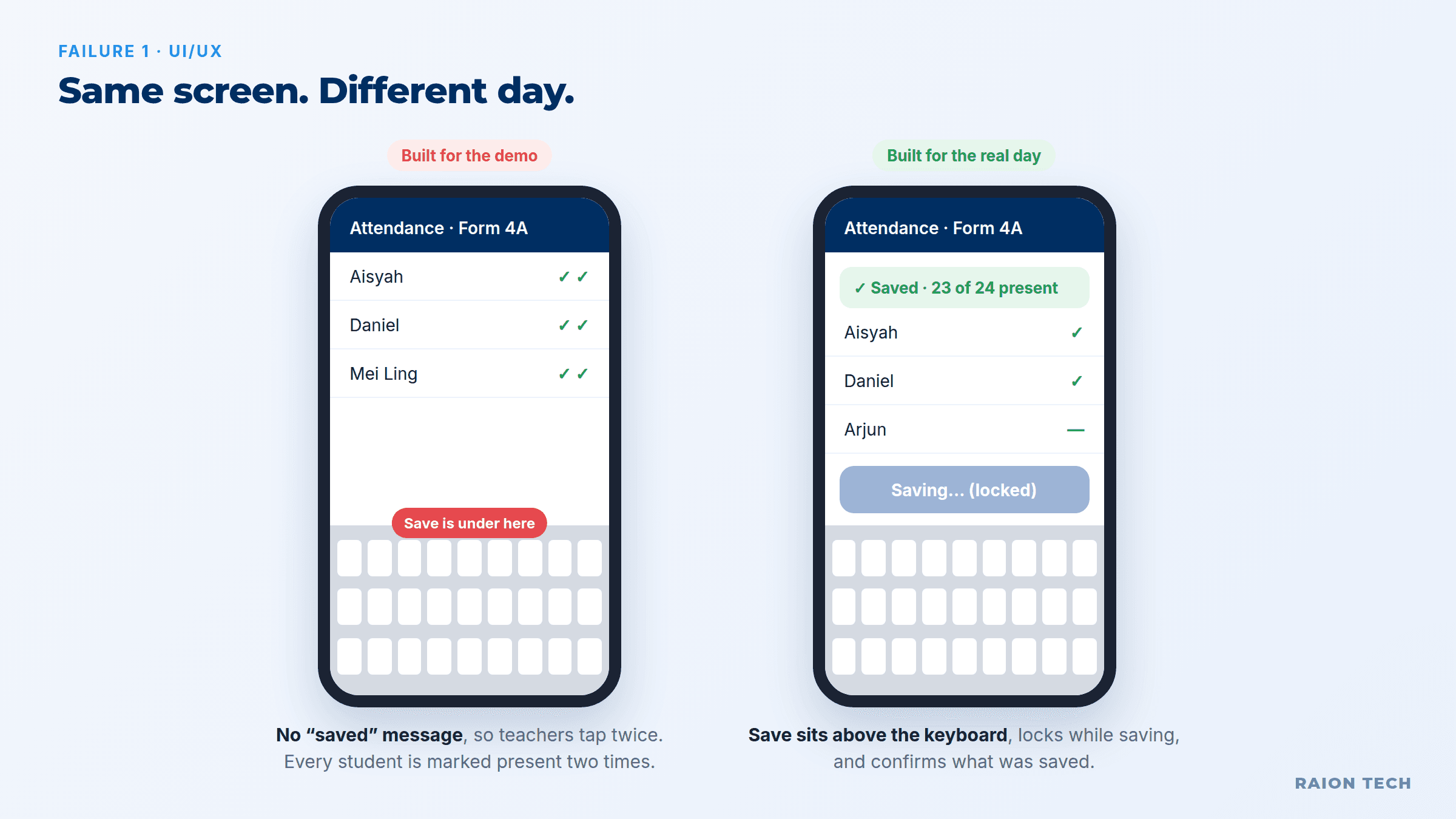
The fix. Design the unhappy states before the happy one. For every screen, write down: what it shows with no data, while loading, when the save fails, and on a 6-inch phone. Then prompt for those states by name. One naming list for actions ("Save" means save, everywhere) removes half the confusion.
2. Implementation: the logic and the secrets live in the wrong place
The problem. AI builders like to put everything in the browser because it is fastest to show. That includes the price calculation, the "is this user allowed to see this?" check and sometimes the API key. Anything in the browser can be read and changed by anyone who opens the developer tools.
This is not theoretical. In 2025 a researcher scanned 1,645 apps from one popular AI app builder's showcase and found about 170 of them let anyone read or write the database with the public key, because row-level security was never switched on (Superblocks write-up of CVE-2025-48757). Names, emails and some API keys were exposed.
A 6-person renovation firm in Petaling Jaya vibe-codes a quotation tool. The margin is calculated in the browser and every staff login can load every quote. A junior sales rep who leaves the company opens the network tab, copies the full price list with cost and margin per item, and takes it to a competitor. Nothing was hacked. The app simply handed it over.
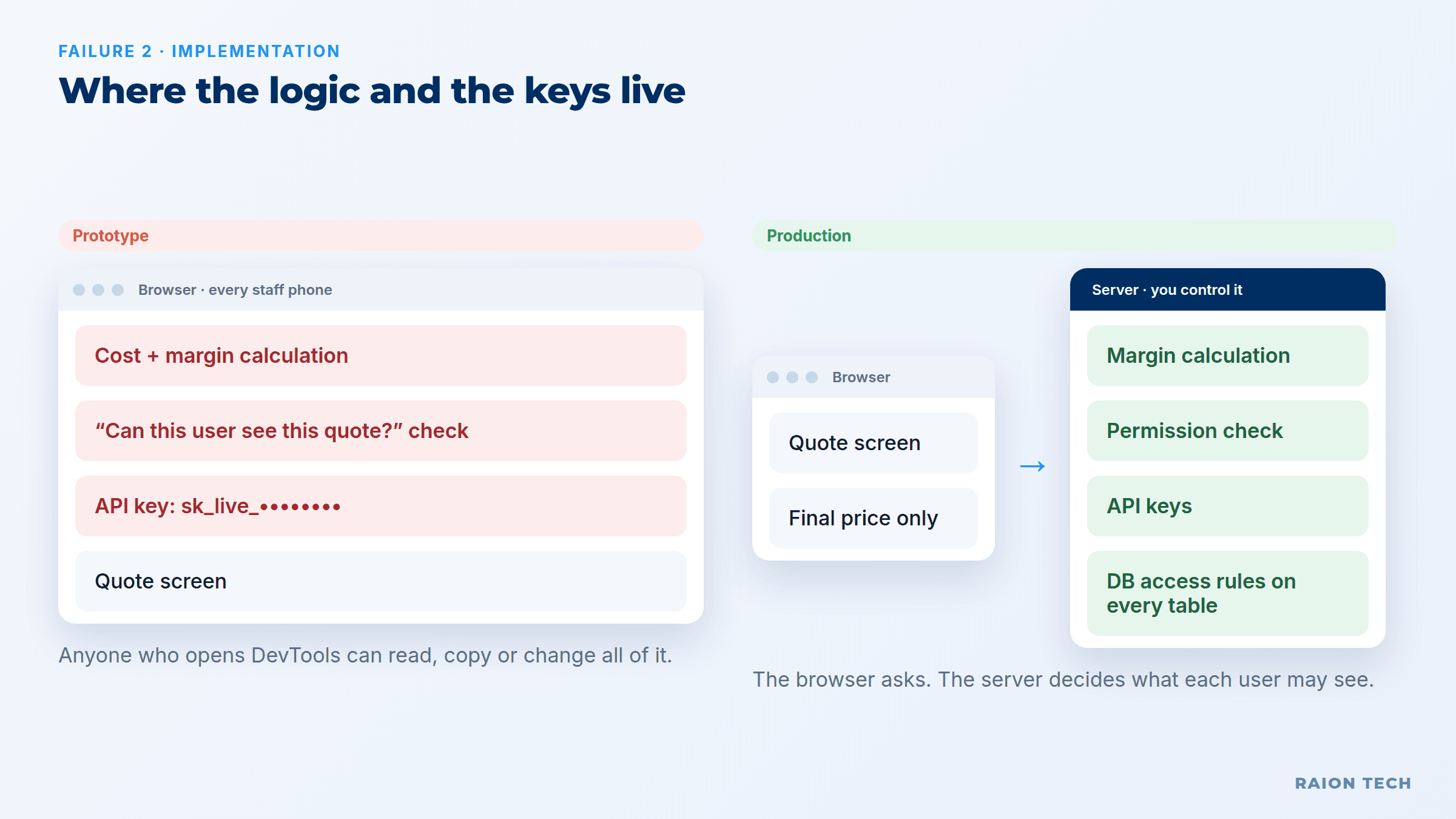
The fix. Three rules. Prices, permissions and anything involving money are calculated on the server, never in the browser. Every table has access rules that are tested by logging in as the lowest-level user and trying to read someone else's data. No secret key ever appears in front-end code; ask the AI directly "show me every key in the client code" and remove them. Our post on how business websites get hacked covers the same trap on websites.
3. Data: no model, no rules, no backup
The problem. A prototype stores whatever you type. Phone numbers arrive as "012-345 6789", "+60123456789" and "0123456789". Names are entered twice. Deleting a customer deletes their invoices too. And nobody set up a backup, because the preview never needed one.
The most public example: in July 2025 SaaStr founder Jason Lemkin was nine days into a vibe-coding experiment when the AI agent ran destructive commands and wiped a database holding records on 1,206 executives, despite being told not to make changes (eWeek). The platform's CEO called it "unacceptable" and added separation between development and production data afterwards.
A dental clinic in Johor Bahru builds a booking app that sends WhatsApp reminders. A third of the reminders silently fail because receptionists typed phone numbers four different ways. No-shows go up, not down, and the clinic blames WhatsApp. The real cause is one missing rule: store every number in one international format at the moment it is typed.
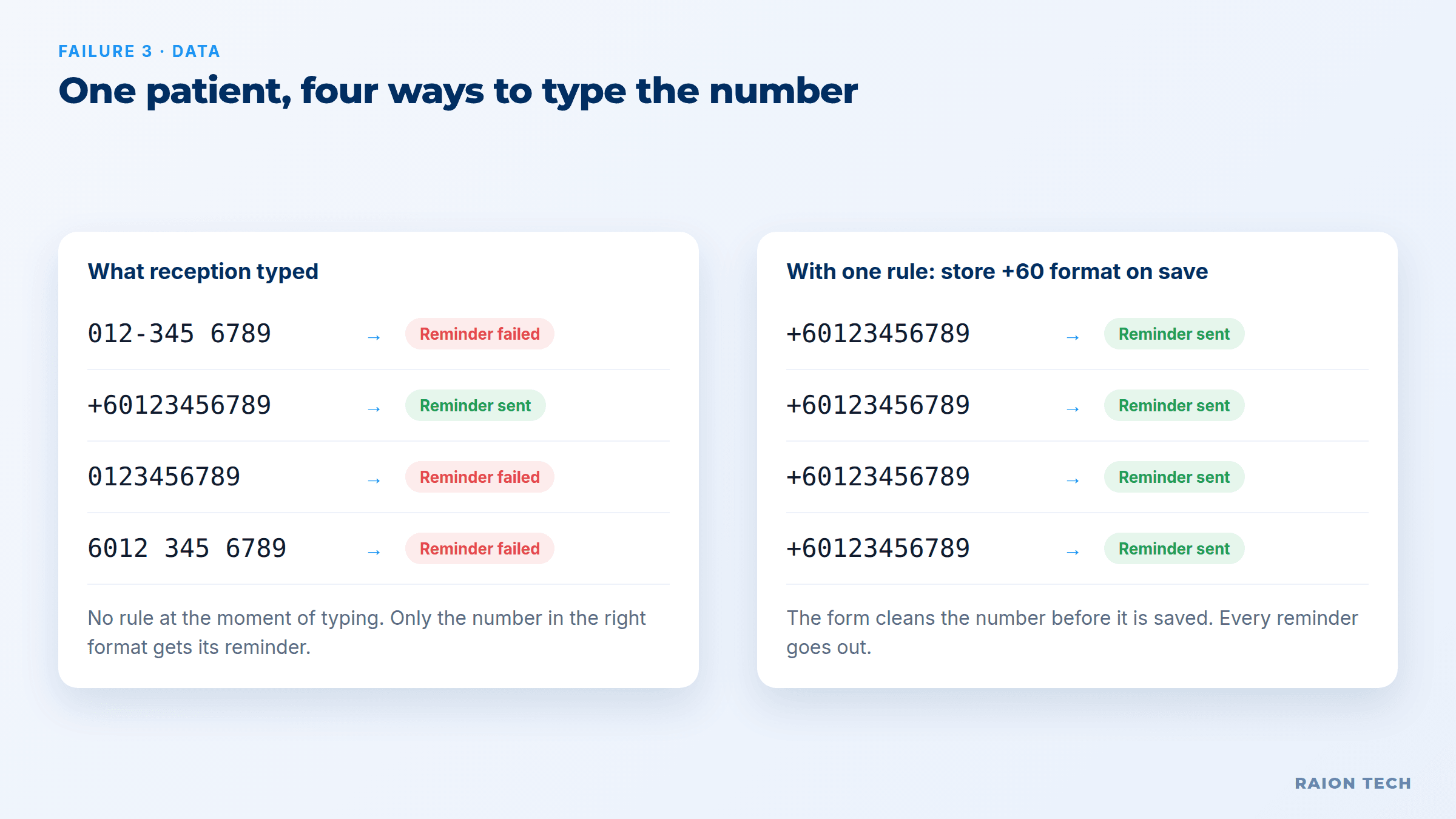
The fix. Before the next prompt, write your data on one page: what a customer is, what a booking is, which fields are required, what format each field takes, and what happens when something is deleted (usually: archive, never erase). Turn on automatic daily backups and do one test restore. A backup you have never restored is a hope, not a backup.
Frequently Asked Questions
4. Scale: fine at 50 records, frozen at 20,000
The problem. Scale for an SME is not millions of users. It is the same 15 staff using the app for a year. Prototype screens typically load every record and filter on the phone. They also assume one person acts at a time, so two people can book the same slot or approve the same claim.
A property agency in Penang builds a listing app for its 30 agents. In month one it loads instantly. By month eight it holds 9,000 listings with photos, and the listing page downloads every one of them before showing anything. Agents on mobile data wait 20 seconds, give up, and go back to the shared spreadsheet. Two agents also book the same unit viewing at 3pm because nothing stops a double booking.
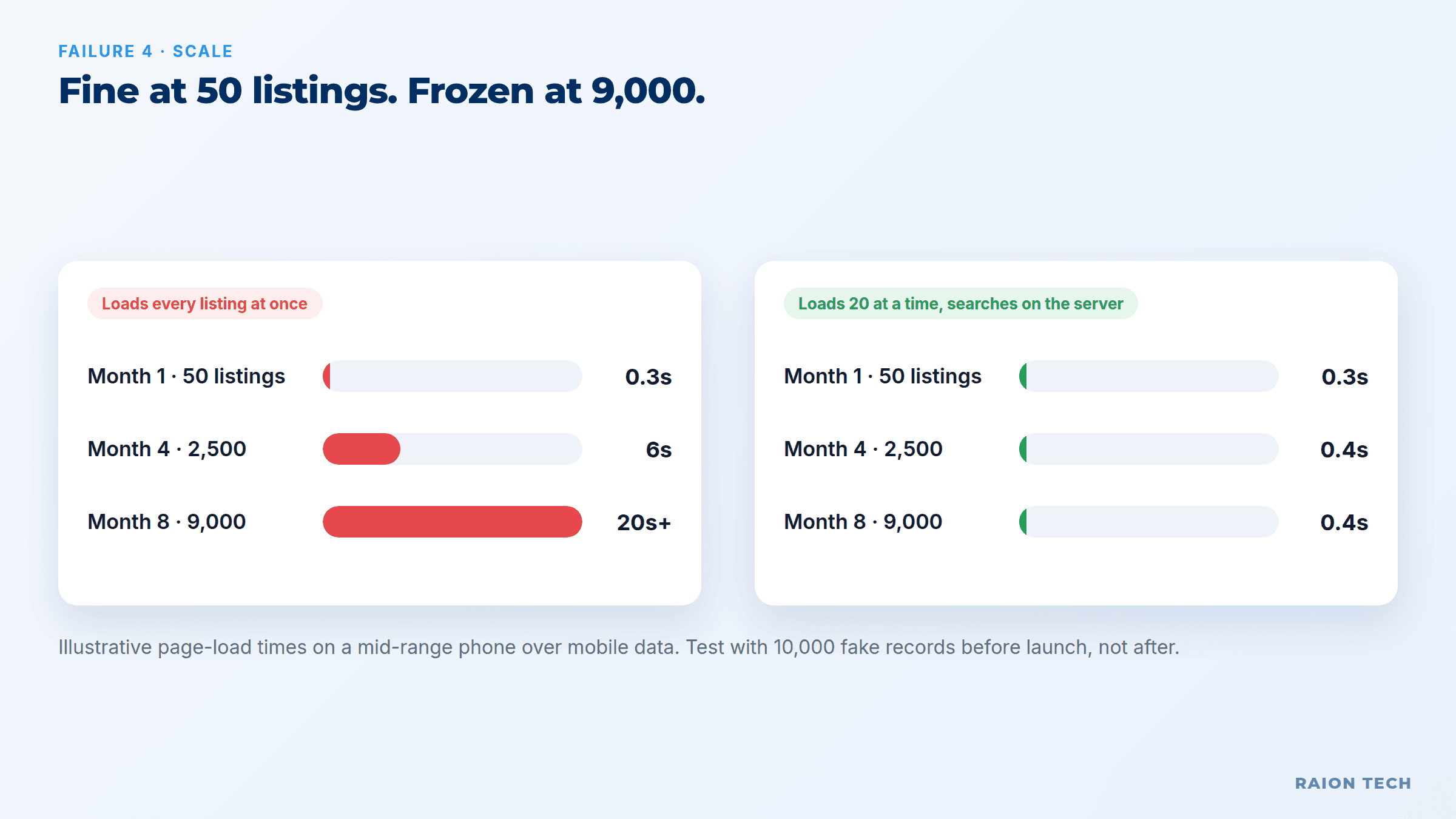
The fix. Load 20 records at a time and search on the server. Compress photos at upload. Add a rule in the database (not just on the screen) that one slot can only be booked once. Then test with fake volume: generate 10,000 records before launch and use the app on a mid-range phone over mobile data.
5. Maintenance: nobody can change it safely
The problem. After a few weeks the app is thousands of lines that nobody has read. Each new prompt fixes the reported bug and quietly breaks two other screens, because the AI rewrites more than it needs to and nothing tests what changed. This is the prompt loop: you spend more time re-fixing old features than building new ones.
A car dealership's sales manager vibe-codes a commission calculator. A new incentive scheme needs one extra rule. The fix works, but it also changes how rounding is done on the old scheme, and three salesmen are underpaid by a few hundred ringgit each. It is found two months later, at payroll, by an angry salesman with a calculator.
The fix. Put the code in version control from day one so every change can be rolled back. Keep a test list of the five calculations that must never change, with known answers, and run it after every change. Ask the AI for the smallest possible change and to explain what else it touched.
6. Ownership: the app lives in someone's personal account
The problem. The hosting, database, domain and API keys are all signed up under one person's personal email and credit card. Usage-based services bill per message or per request with no limit set. Personal data of customers sits in a service nobody has checked against your PDPA obligations.
A training company's marketing executive builds an event registration app on a free tier, under her own email. She resigns. Three months later the card on file expires, the database is paused, and 2,000 registrations for next month's seminar are unreachable. Nobody else has the password.

The fix. Every account sits under a company email with at least two admins. Set spending limits on every usage-billed service. Write one page that lists where the app is hosted, where the data lives, who can access it and how to restore it.
How is a prototype different from production software?
A prototype proves the idea is worth building. Production software keeps working when you are not watching. The screens can look identical; everything underneath is different.
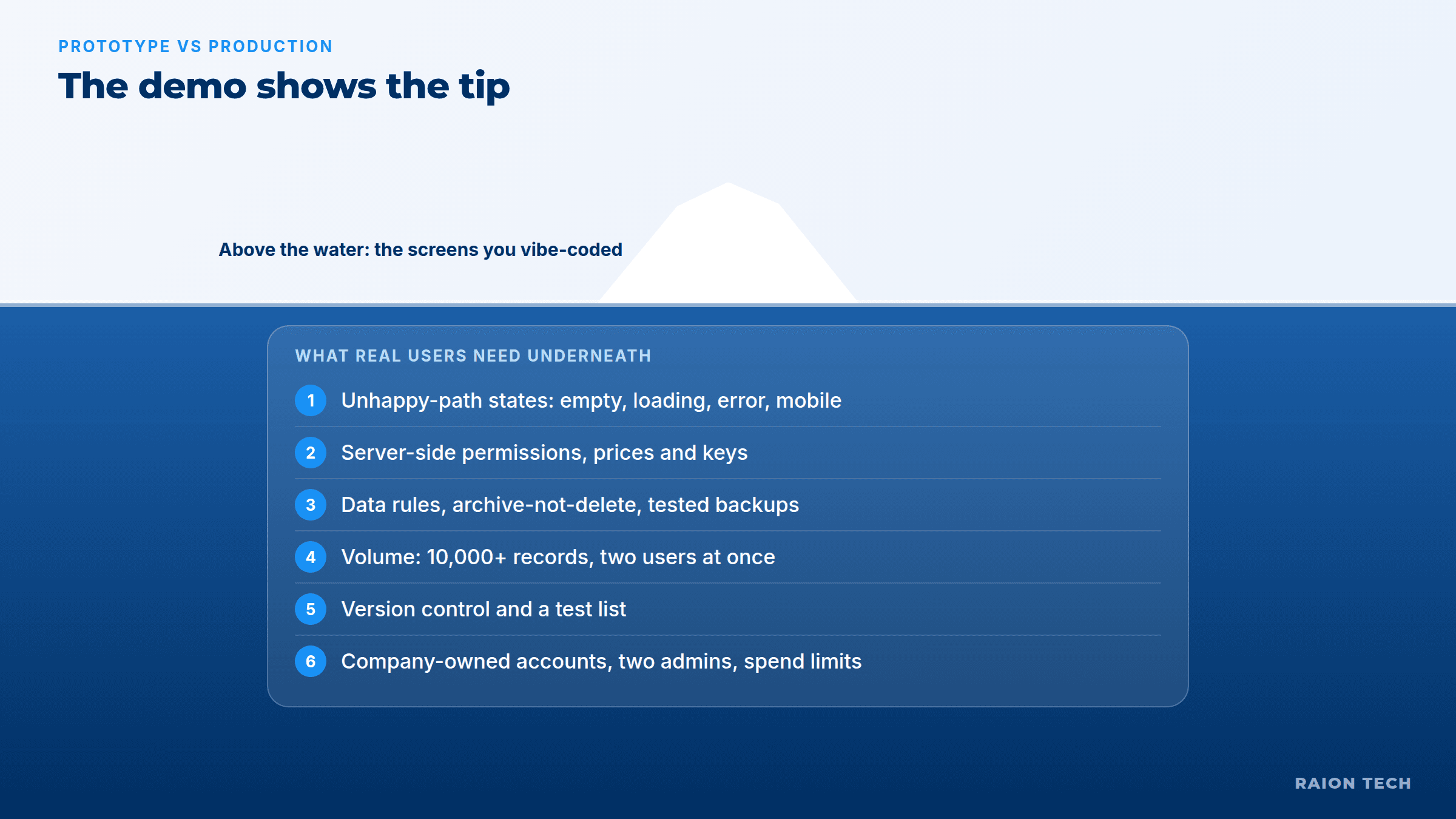
| Area | Vibe-coded prototype | Production-ready app |
|---|---|---|
| Screens | Happy path on a laptop | Empty, loading, error and mobile states |
| Permissions | Checked on screen | Enforced on the server and in the database |
| Data | Whatever was typed | Defined fields, formats and archive rules |
| Backup | None | Daily, with a tested restore |
| Volume | Tested with 20 records | Tested with 10,000+ records on a phone |
| Changes | Prompt and hope | Version control and a test list |
| Accounts | Builder's personal email | Company-owned, two admins, spend limits |
Is the problem vibe coding itself?
No, and this is where most advice gets it wrong. The problem is skipping the step between "it works on my screen" and "my business runs on it". A vibe-coded prototype is the best software brief a business owner has ever been able to produce: real screens, real flows, the fields you actually use. Throwing it away is a waste. Shipping it untouched is a risk.
The same pattern shows up with bought software too. Our post on why custom software projects fail found the failure is rarely the code; it is the scope and the setup. And rolling anything out to staff has its own playbook, covered in rolling out a system to your team.
How to take a vibe-coded app from prototype to production
When should you build, buy, or get help?
Build it yourself when the app is internal, touches no payments and little personal data, and one person can afford for it to be down for a day. Buy when the job is common: lead capture, follow-up and sales pipelines are solved problems, and a tool like Raion HUB already handles the permissions, backups and scale described above. Get help hardening it when your prototype does something specific to your business that no product does, which is what our custom solutions work is for. For the wider picture of what to automate first, the CRM automation guide for SMEs is the place to start.
The bottom line
Vibe coding gets you to a convincing screen in an afternoon, and that is worth a lot. What it does not give you is the unhappy-path design, server-side security, clean data, backups, volume testing and ownership that real use demands. Treat the prototype as your specification, harden those six areas before staff or customers depend on it, and the speed you gained stays a gain instead of becoming next quarter's emergency.